
2021-8-11 前端達人
組件(Component)是Vue.js最強大的功能之一。組件可以擴展HTML元素,封裝可重用的代碼。根據項目需求,抽象出一些組件,每個組件里包含了展現、功能和樣式。每個頁面,根據自己所需,使用不同的組件來拼接頁面。這種開發模式使前端頁面易于擴展,且靈活性高,而且組件之間也實現了解耦。本文將詳細介紹Vue組件基礎用法

在 Vue 里,一個組件本質上是一個擁有預定義選項的一個 Vue 實例
組件是一個自定義元素或稱為一個模塊,包括所需的模板、邏輯和樣式。在HTML模板中,組件以一個自定義標簽的形式存在,起到占位符的功能。通過Vue.js的聲明式渲染后,占位符將會被替換為實際的內容
下面是一個最簡單的模塊示例
<div id="app"> <xiaohuochai></xiaohuochai> </div>

組件注冊包括全局注冊和局部注冊兩種
【全局注冊】
要注冊一個全局組件,可以使用 Vue.component(tagName, options)
Vue.component('my-component', { // 選項 })
組件在注冊之后,便可以在父實例的模塊中以自定義元素 <my-component></my-component> 的形式使用
[注意]要確保在初始化根實例之前注冊了組件
<div id="example"> <my-component></my-component> </div>

<script> // 注冊 Vue.component('my-component', {
  template: '<div>A custom component!</div>' }) // 創建根實例 new Vue({
  el: '#example' }) </script>

【局部注冊】
通過使用組件實例選項components注冊,可以使組件僅在另一個實例/組件的作用域中可用
<div id="example"> <my-component></my-component> </div>
<script> // 注冊 var Child = {
  template: '<div>A custom component!</div>' }; // 創建根實例 new Vue({
  el: '#example',
    components: { // <my-component> 將只在父模板可用 'my-component': Child
  }
}) </script>
組件樹
使用組件實例選項components注冊,可以實現組件樹的效果
<div id="example"> <my-component></my-component> </div>
<script> // 注冊 var headerTitle = {
    template: '<p>我是標題</p>',
}; var headerContent = {
    template: '<p>我是內容</p>',
}; var header = {
  template: ` <div class="hd"> <header-content></header-content> <header-title></header-title> </div>  `,
    components: { 'header-content': headerContent, 'header-title': headerTitle
  }
}; // 創建實例 new Vue({
  el: '#example',
    components: { 'my-component': header
  }
}) </script>

對于大型應用來說,有必要將整個應用程序劃分為組件,以使開發可管理。一般地組件應用模板如下所示
<div id="app"> <app-nav></app-nav> <app-view> <app-sidebar></app-sidebar> <app-content></app-content> </app-view> </div>
【v-once】
盡管在 Vue 中渲染 HTML 很快,不過當組件中包含大量靜態內容時,可以考慮使用 v-once 將渲染結果緩存起來
Vue.component('my-component', {
  template: '<div v-once>hello world!...</div>'
})
在組件注冊中,使用template選項中拼接HTML元素比較麻煩,這也導致了HTML和JS的高耦合性。慶幸的是,Vue.js提供了兩種方式將定義在JS中的HTML模板分離出來
【script】
在script標簽里使用 text/x-template 類型,并且指定一個 id
<script type="text/x-template" id="hello-world-template"> <p>Hello hello hello</p> </script>
Vue.component('hello-world', {
  template: '#hello-world-template'
})
上面的代碼等價于
Vue.component('hello-world', {
  template: '<p>Hello hello hello</p>'
})
下面是一個簡單示例
<div id="example"> <my-component></my-component> </div>
<script type="text/x-template" id="hello-world-template"> <div>hello world!</div> </script>
<script> Vue.component('my-component', {
  template: '#hello-world-template' }) new Vue({
  el: '#example' }) </script>

【template】
如果使用<template>標簽,則不需要指定type屬性
<div id="example"> <my-component></my-component> </div>
<template id="hello-world-template"> <div>hello world!</div> </template>
<script> // 注冊 Vue.component('my-component', {
  template: '#hello-world-template' }) // 創建根實例 new Vue({
  el: '#example' }) </script>

對于組件的命名,W3C規范是字母小寫且包含一個中劃線(-),雖然Vue沒有強制要求,但最好遵循規范
<!-- 在HTML模版中始終使用 kebab-case --> <kebab-cased-component></kebab-cased-component> <camel-cased-component></camel-cased-component> <pascal-cased-component></pascal-cased-component>
當注冊組件時,使用中劃線、小駝峰、大駝峰這三種任意一種都可以
// 在組件定義中
components: {
  // 使用 中劃線 形式注冊
  'kebab-cased-component': { /* ... */ },
  // 使用 小駝峰 形式注冊
  'camelCasedComponent': { /* ... */ },
  // 使用 大駝峰 形式注冊
  'PascalCasedComponent': { /* ... */ }
}
并不是所有的元素都可以嵌套模板,因為要受到HTML元素嵌套規則的限制,尤其像<ul>,<ol>,<table>,<select> 限制了能被它包裹的元素,而一些像 <option> 這樣的元素只能出現在某些其它元素內部
[注意]關于HTML標簽的詳細嵌套規則移步至此
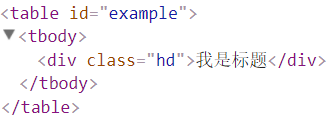
在自定義組件中使用這些受限制的元素時會導致一些問題,例如
<table id="example"> <my-row>...</my-row> </table>
自定義組件 <my-row> 被認為是無效的內容,因此在渲染的時候會導致錯誤
<script> // 注冊 var header = {
  template: '<div class="hd">我是標題</div>' }; // 創建實例 new Vue({
  el: '#example',
    components: { 'my-row': header
  }
}) </script>

【is屬性】
變通的方案是使用特殊的 is 屬性
<table id="example"> <tr is="my-row"></tr> </table>
<script> // 注冊 var header = {
  template: '<div class="hd">我是標題</div>' }; // 創建實例 new Vue({
  el: '#example',
    components: { 'my-row': header
  }
}) </script>
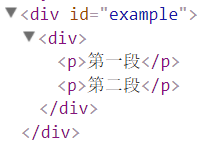
Vue強制要求每一個Vue實例(組件本質上就是一個Vue實例)需要有一個根元素
如下所示,則會報錯
<div id="example">
  <my-component></my-component>
</div>
<script>
// 注冊 Vue.component('my-component', {
  template: ` <p>第一段</p> <p>第二段</p>  `,
})
// 創建根實例
new Vue({
  el: '#example' })
</script>

需要改寫成如下所示
<script>
// 注冊 Vue.component('my-component', {
  template: ` <div> <p>第一段</p> <p>第二段</p> </div>  `,
})
// 創建根實例
new Vue({
  el: '#example' })
</script>
一般地,我們在Vue實例對象或Vue組件對象中,我們通過data來傳遞數據
<div id="example"> <my-component></my-component> <my-component></my-component> <my-component></my-component> </div>
<script> // 注冊 Vue.component('my-component', {
  template: '<div>{{message}}</div>',
  data:{
      message: 'hello' }
}) // 創建根實例 new Vue({
  el: '#example' }) </script>
運行上面的代碼,會使Vue停止執行,并在控制臺發出錯誤提示,告訴你在組件中 data 必須是一個函數

可以用如下方式來繞開Vue的錯誤提示
<script> // 注冊 var data = {counter: 0}
Vue.component('my-component', {
  template: '<button v-on:click="counter += 1">{{ counter }}</button>',
  data:function(){ return data;
  }
}) // 創建根實例 new Vue({
  el: '#example' }) </script>
由于這三個組件共享了同一個 data,因此增加一個 counter 會影響所有組件
當一個組件被定義, data 需要聲明為返回一個初始數據對象的函數,因為組件可能被用來創建多個實例。如果 data 仍然是一個純粹的對象,則所有的實例將共享引用同一個數據對象。通過提供 data 函數,每次創建一個新實例后,能夠調用 data 函數,從而返回初始數據的一個全新副本數據對象
因此,可以通過為每個組件返回全新的 data 對象來解決這個問題:
<script> // 注冊 Vue.component('my-component', {
  template: '<button v-on:click="counter += 1">{{ counter }}</button>',
  data:function(){ return {counter: 0};
  }
}) // 創建根實例 new Vue({
  el: '#example' }) </script>
現在每個 counter 都有它自己內部的狀態了
有時候,可能想在某個組件的根元素上監聽一個原生事件。直接使用v-bind指令是不生效的
<div id="example"> <my-component @click="doTheThing"></my-component> <p>{{message}}</p> </div>
<script> Vue.component('my-component', {
  template: '<button>按鈕</button>',
}) new Vue({
  el: '#example',
  data:{
    message:0 },
  methods:{
    doTheThing(){ this.message++;
    }
  }
}) </script>
可以使用 .native 修飾 v-on指令即可
<div id="example"> <my-component @click.native="doTheThing"></my-component> <p>{{message}}</p> </div>
<script> Vue.component('my-component', {
  template: '<button>按鈕</button>',
}) new Vue({
  el: '#example',
  data:{
    message:0 },
  methods:{
    doTheThing(){ this.message++;
    }
  }
}) </script>
分享此文一切功德,皆悉回向給文章原作者及眾讀者.
免責聲明:藍藍設計尊重原作者,文章的版權歸原作者。如涉及版權問題,請及時與我們取得聯系,我們立即更正或刪除。
藍藍設計( www.dzxscac.cn )是一家專注而深入的界面設計公司,為期望卓越的國內外企業提供卓越的UI界面設計、BS界面設計 、 cs界面設計 、 ipad界面設計 、 包裝設計 、 圖標定制 、 用戶體驗 、交互設計、 網站建設 、平面設計服務